By mid-afternoon, a lot of desk workers feel the same things: a stiff lower back, shoulders creeping toward the ears, and eyes strained from staring slightly downward at a laptop. Most of us blame the job. The real culprit is often the setup.
A riser desk is one of the cheapest ways to fix that setup, because it works with the furniture you already own. Instead of buying a whole new desk, you place a height-adjustable platform on top of the one you have and gain the freedom to work sitting or standing.
This guide explains what a riser desk is, how the different lift mechanisms work, how it stacks up against a full standing desk, what the research actually says about the benefits, and what to check before you buy. It also includes the latest 2026 updates, so you are not relying on outdated advice.
What Is a Riser Desk?
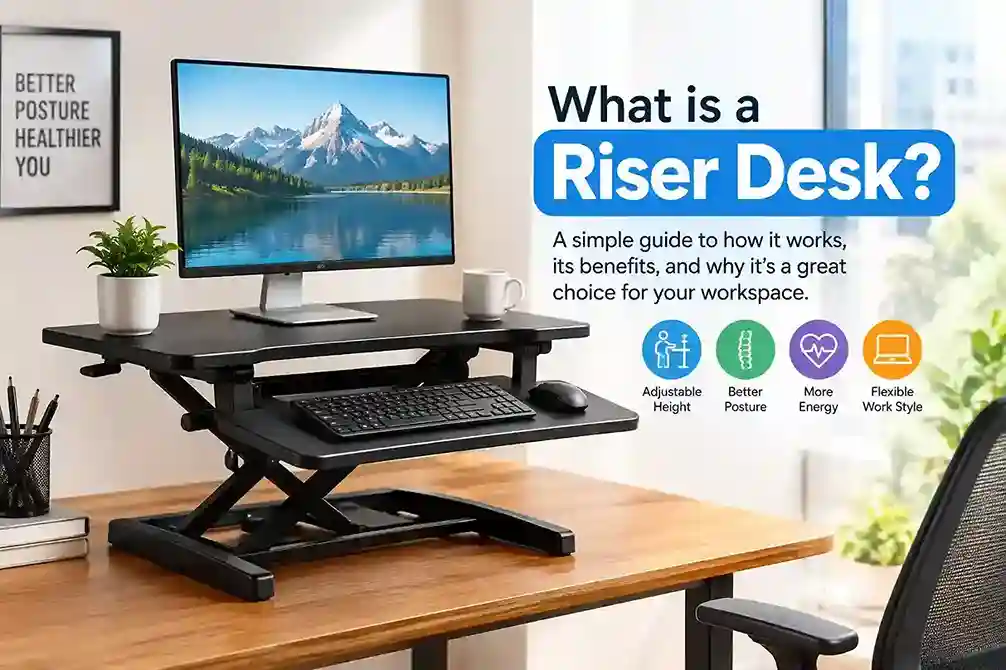
A riser desk is a height-adjustable platform that sits on top of your existing desk or table. It lifts your monitor, keyboard and mouse to standing height, then lowers them again when you want to sit. You may also see it called a desk riser, a desk converter, or a standing desk converter. Retailers use these names interchangeably for the same product.
The appeal is simple. You keep your current desk, skip the furniture shopping, and still get a sit-stand workstation. Most units arrive ready to use, so setup is closer to unboxing a monitor than assembling a desk. Current guides put the typical price range at roughly $130 to $250 for a solid model, which is a fraction of what a full motorized desk costs.
How a Riser Desk Is Built
Most models use a two-tier layout. The upper tier carries your monitor or laptop. The lower tier is a keyboard tray that holds your keyboard and mouse. The two tiers move together, so one adjustment resets your whole workstation.
That layout matters for ergonomics. When you stand, your forearms should stay roughly parallel to the floor with elbows near a right angle, and the top of your screen should sit around eye level. A two-tier design lets you meet both targets, which a plain monitor stand cannot do.
How a Riser Desk Lifts: Three Mechanisms
Gas spring (pneumatic). You squeeze a handle or lever, and the platform glides up or down with almost no effort. It needs no power, makes little noise, and is the most common design. Higher-end versions adjust smoothly to any height within their range rather than in fixed steps.
Manual crank. A hand-turned knob raises and lowers the surface. It is slower, but it has fewer moving parts, which tends to mean lower cost and fewer things to fail.
Electric. A small motor lifts the platform at the push of a button, and many models store height presets. You pay more and need a nearby outlet, but it is the easiest to adjust many times a day.
Riser Desk vs Standing Desk: Head-to-Head Comparison
This is the question most buyers are really asking when they search what is a riser desk. Both allow you to switch between sitting and standing, but they approach the issue in different ways. A standing desk replaces your furniture. A riser adds to it.
| Factor | Riser Desk | Full Standing Desk |
| What it is | Platform that sits on your current desk | Complete desk with adjustable legs |
| Typical price | About $130 to $250 for most good models | Often $300 to $1,000+ |
| Setup time | Minutes, usually little or no assembly | Frame assembly, often 30 to 60+ minutes |
| Work surface | Limited to the riser platform (often around 30 inches wide) | Entire desktop, commonly 48 to 72 inches |
| What moves | Only the items on the riser | Everything on the desk |
| Stability when typing | Good on quality models, but some wobble at full height | Generally more stable, especially with dual legs |
| Portability | Easy to move, store or take to another desk | Heavy and semi-permanent |
| Best for | Renters, small spaces, trying standing on a budget | Daily heavy use, multi-monitor setups, long-term investment |
| Height range | Limited by riser travel plus your desk height | Wider range, fits very tall and very short users |
| Commitment | Low | High |
The verdict: If you want to test whether standing suits you, or you cannot change your furniture, a riser desk is the lower-risk start. If you already know you will switch positions many times a day, use several monitors, or need a large clear surface, a full standing desk earns its price. Many people use a riser first and upgrade later once the habit sticks.
One catch worth knowing: a riser adds height on top of your existing desk. If your desk is already tall, your screen can end up above comfortable eye level. Check your numbers before you order.
Types of Riser Desks Compared
Not every riser suits every workflow. This table shows how the main styles differ.
| Type | Adjustment | Power needed | Typical strengths | Typical trade-offs |
| Gas spring | Lever or handle | No | Quiet, smooth, most popular | Weight must match the spring rating |
| Manual crank | Hand knob | No | Simple, low cost, durable | Slow to adjust |
| Electric | Button, often with presets | Yes | Fastest and easiest changes | Higher price, cable management |
| Compact or portable | Fixed steps or simple lift | No | Light, easy to store, good for laptops | Small surface, limited capacity, often no keyboard tray |
If you work from a single laptop at a shared table, a compact model may be enough. If you have a full monitor, keyboard and accessories, choose a two-tier gas spring or electric unit.
Benefits of a Riser Desk: What the Research Actually Says
Marketing for standing products often overpromises, so here is a more careful view. A riser desk is a tool that makes standing easy. The benefits come from using it well, not from owning it.
1. Less Low Back Discomfort
A 2018 systematic review and meta-analysis in Ergonomics concluded that sit-stand workstations may reduce low back discomfort among workers, while noting that more research is needed on how much standing is ideal.
An honest caveat: a Cochrane review on workplace interventions rated the quality of the evidence as low or very low, mainly because of small studies. It found that sit-stand desks were suggestive of improvement, but not conclusive. So a riser desk can help, but it is not a cure for existing back conditions. If you have persistent pain, see a clinician.
2. Better Posture and Screen Position
A riser desk raises your monitor toward eye level, which reduces the forward head tilt that comes from looking down at a flat laptop. Pair it with a separate keyboard and mouse and your shoulders and wrists can sit in a more neutral position.
3. Less Total Sitting Time
This is the most dependable benefit. Because switching takes seconds, you are far more likely to stand during calls, email and reading. A 2025 scoping review in BMC Public Health found that standing desks improved movement patterns in several studies, though the authors described the overall evidence in university settings as still limited.
4. Gentler Blood Sugar Response After Meals
A well-known University of Chester study reported that standing after lunch reduced the post-meal blood sugar rise compared with sitting. The sample was small, so treat it as promising rather than final. Light movement after eating is a sensible habit either way.
5. Possible Productivity and Energy Gains
A Texas A&M study of call center employees found people using sit-stand desks were about 46 percent more productive over six months than seated colleagues. Results in a call center will not match every job, but it suggests that comfort and alertness can translate into output.
6. Modest Calorie Burn
Standing does burn more energy than sitting, but the difference is small. Do not buy a riser desk as a weight-loss tool. Think of it as a way to add small amounts of movement to a day that would otherwise be motionless.
Best practice: the research consistently points to changing positions, not standing all day. Long periods of static standing bring their own aches in feet, knees and legs.
Who Should Buy a Riser Desk?
A riser desk is a strong fit if you:
- Rent your home or share an office and cannot replace furniture
- Have a small workspace where a second desk will not fit
- Want to try sit-stand working before spending more
- Use one monitor or a laptop with a separate keyboard and mouse
- Like your current desk and want to keep it
You may want a full standing desk instead if you:
- Run a heavy multi-monitor setup
- Need lots of clear surface space at both heights
- Are very tall and need extra height range
- Will adjust position many times every day
How to Choose the Right Riser Desk
Three specifications decide whether a riser desk works for you.
Height Range and Your Body
Measure your standing elbow height and compare it with what the riser can reach once placed on your desk. Taller users need to check maximum height carefully, because budget models can top out too low. Also check the opposite problem: if the lowest setting still puts your screen too high when seated, the riser is a poor match for your desk.
Weight Capacity and Surface Area
Add up everything you will place on the unit, including monitor, laptop, accessories and a drink, then leave a safety margin. If capacity is exceeded on a gas spring model, the platform can slowly sink during the day. Also measure your monitor width against the platform so nothing overhangs.
If you plan to use two screens, shop specifically for dual-monitor-ready models with a wide platform and a higher rated load.
Budget
Entry-level gas spring risers start around the $100 to $150 mark, and many well-reviewed models land between $130 and $250. Electric models and wide dual-monitor units usually cost more. For most people, a reliable mid-range gas spring unit with a keyboard tray offers the best value.
Latest Updates on Riser Desks (2026)
The category keeps evolving, and a few changes are worth noting if you are shopping now.
1. The price sweet spot is clear. Current 2026 buying guides consistently frame a good standing desk riser as a $130 to $250 purchase, which positions it as a low-cost route into sit-stand working.
2. Retailers now compare risers directly against full standing desks. Newer guides include side-by-side comparisons showing the riser as the cheaper, non-permanent option and the full desk as the premium choice for full-surface adjustment and presets. Expect more transparent trade-off advice rather than pure promotion.
3. Two-tier, stepless gas spring designs are now standard. Newer models highlight one-handed, stepless height adjustment, no-assembly setup, and crossed-frame construction aimed at reducing wobble.
4. Brands are positioning risers as an entry point, not a final solution. Several 2026 guides describe the riser as the lower-risk way to build a standing habit, then recommend a full desk once usage justifies it.
5. Evidence is more nuanced than the hype. The latest reviews support reducing sitting time and improving movement, while also admitting that long-term proof for pain and health outcomes is limited. A riser desk is best viewed as a helpful habit tool, not a medical device.
6. Real-world fit matters more than specs. A riser may push the screen too high on tall desks, according to more recent guidelines, so always check your desk height against the riser’s lowest setting.
Prices and models change quickly. Check current listings before you buy.
How to Set Up and Use a Riser Desk Correctly
Having a riser does not automatically improve posture. These habits make the difference.
Start gradually. Begin with short standing periods, around 15 to 20 minutes at a time, and build up over a couple of weeks. Jumping straight to hours of standing is the fastest route to sore feet.
Aim for variety, not endurance. Alternate sitting and standing through the day and move around between sessions. A lot of ergonomics manuals recommend spending about the same amount of time in each position, depending on how comfortable it is.
Set the keyboard tray correctly. Wrists straight, shoulders relaxed, elbows close to a right angle. A tray set too high will pull your shoulders up and create the neck tension you were trying to avoid.
Put the monitor at the right height. The top edge of the screen should sit near eye level, about an arm’s length away.
Use a stable base. A wobbly desk magnifies every keystroke. Verify the stability and levelness of the desk underneath the riser.
Wear supportive footwear or use an anti-fatigue mat if you stand for longer stretches.
Do not skip movement. Stand, walk, stretch. A riser makes standing easy, but the goal is regular movement.
Common Mistakes to Avoid
- Buying on price alone. A flimsy riser that wobbles or sags will end up unused.
- Ignoring desk height. Add the riser’s lowest height to your desk and check that your seated screen position still works.
- Overloading the platform. Match total weight to the rated capacity.
- Standing for too long. Rotate positions rather than locking in one.
- Expecting a cure. A riser supports healthier habits, but it does not replace medical care or exercise.
Final Verdict: Is a Riser Desk Right for You?
So, what is a riser desk? It is the simplest way to turn the desk you already own into a sit-stand workstation, usually for $130 to $250 and with almost no setup. It suits renters, small spaces and anyone who wants to test the standing habit without a big purchase.
It is not perfect. It gives you less surface area than a full standing desk, it can wobble on cheaper models, and the health evidence, while encouraging, is still developing. But if you match the height range, weight capacity and platform width to your setup, a riser desk is a low-risk, high-convenience upgrade.
The best riser desk is the one you will actually adjust every day. Measure your desk, pick a sturdy mid-range model, and give yourself a few weeks to build the habit.
